Keyboard shortcuts

Contents
Some mouse click events can also be be achieved by keyboard shortcuts.
Key |
Function |
|---|---|
Information |
|
<Tab> |
Select next element and show info (if in |
<Shift><Tab> |
Select previous element and show info (if in |
Pan, Rotate |
|
<arrow> |
Rotate the configuration |
<Ctrl><arrow> |
Pan the configuration |
<O> |
Set Orthographic view (no orientation change) |
<I> |
Set Isometric view (Orthographic view + X & Y on 30° from horizontal) |
<Shift><O> |
Set Perspective view (no orientation change) |
<Shift><I> |
Set Perspective view (default/initial orientation) |
|
|
|
|
View cube |
|
<F> |
Show Front view |
<B> |
Show Back (Rear) view |
<T> |
Show Top view |
<U> |
Show Underside (Bottom) view |
<R> |
Show Right view |
<L> |
Show Left view |
<D> |
Set Default (Initial) view (Trimetric mode) |
|
|
|
|
Toggles |
|
<G> |
Toggle Ground level |
<W> |
Toggle Water level |
<K> |
Toggle Keys (Idents) |
<N> |
Toggle Node numbers |
Extra |
|
<Ctrl><0> |
Show Renderer info |
 -mode AND element selected)
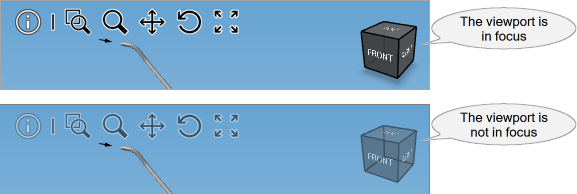
 The keyboard combinations listed above will function only when the viewport is in focus.
Keyboard-shortcuts (last modified: Sep 23, 2025)
See also:
Graphical representation of the configuration